ThinkPythonAI Young Coders · Live Python & AI for kids and teens
Your grade doesn't decide how far you can go in coding.
We find out where your child actually is, place them at the right level, and give them room to climb — from first program to building real AI applications.
- 1Explorer“I can code.”
- 2Builder“I can build software.”
- 3Creator“I can engineer systems.”
Placement by readiness
Why we don't sort kids by grade
A 5th grader who has been coding for two years can be well ahead of an 8th-grade beginner. Put them in the same grade-based class and it fails both: one is bored, the other is lost.
- ✕ “Your child is in 7th grade, so they go in the 7th-grade class.”
- ✕ Everyone gets the same exercise, whatever their level
- ✕ Wait for enough same-grade students to start
- ✕ Progress follows the calendar
- ✓ Placed by experience, confidence, ability and readiness
- ✓ Same core concept, different depth of challenge
- ✓ Cohorts formed by level, with age and schedule in mind
- ✓ Move up when ready, not when the calendar says so
Progressive challenge
Same core concept. Different level of challenge.
Take one classic project — a number guessing game. Here's how it looks at each level.
Make it work
Pick a random number, take guesses, say “higher” or “lower” with a loop and conditions.
while guess != secret:
guess = int(input("Guess: "))Make it a real program
Add scoring, difficulty levels and input validation, all organised into functions.
def play(level):
    secret = pick(level)
return score(attempts)Engineer it
A modular design with saved high scores, clean architecture and tests that prove it works.
class Game:
    def __init__(self, store):
        ...
# tests/test_game.py
Nobody is held back because a classmate is younger or newer. And beginners build real confidence without being thrown in the deep end.
The Python pathway · recommended start
Explorer → Builder → Creator
Each level is roughly a 6-month pathway with weekly live classes. Placement and pace stay flexible: a student moves on when they've earned it.
Python Explorer
“I can code.”
Foundations, confidence and real fluency — writing programs independently instead of copying them.
- Variables, data types, input/output
- Conditions, Boolean logic and loops
- Strings, lists and dictionaries
- Functions and basic program structure
- Reading errors and fixing your own bugs
- First steps with GitHub
Python Builder
“I can build software.”
From learning Python to building software — structured, multi-feature programs and real software thinking.
- Functions and program design, stronger decomposition
- Collections and beginner algorithms
- Files and persistent data
- OOP basics
- APIs, JSON and automation
- Error handling and structured debugging
Python Creator
“I can engineer systems.”
From building programs to engineering systems — architecture, reliability and the bridge into AI engineering.
- Advanced OOP and program architecture
- Reusable components and data modeling
- Algorithms
- APIs, integrations and workflows
- Testing and reliability
- Advanced debugging and a GitHub workflow
How class actually works
Students code most of the class, not watch it.
Two training formats run through every level. One builds fluency; the other builds the judgment to know when code is wrong.
Coding Gym
Builds coding fluency
Frequent, short reps where students write the code themselves instead of copying the instructor. Difficulty climbs as they do.
Debugging Gym
Builds judgment · from ~Month 3
Once students know enough to debug meaningful programs, they train it deliberately, ending with code an AI wrote that they have to review and fix.
We don't want students who can only ask AI to write code. We want students who can
Our philosophy
AI makes understanding code more valuable, not less.
Python isn't obsolete because AI can write it. When AI generates the code, someone still has to understand it. Students who learn Python first can build AI applications, not just use ChatGPT.
Prompt → copy → paste → hope. When it breaks, they're stuck, and they can't tell a confident wrong answer from a right one.
They read what AI produces, test it, catch its mistakes and wire it into software of their own design.
Not: ChatGPT → copy code → call yourself an AI developer.
The AI pathway · the next stage
AI Explorer → AI Builder → AI Creator
Not a prompt-writing course. Students write Python to build real AI applications, and learn how to make them reliable.
Python foundations → Build → Debug → Create → AI
The strongest route. Students arrive at AI already able to read, test and debug what it produces.
For students who already code
Students with solid foundations can take a readiness assessment and enter the AI pathway at the right level. Ask Crystal about it →
AI Explorer
“I understand how AI works.”
Not a “how to use ChatGPT” course. Students learn what AI actually is, and move from AI consumers to AI builders.
- What an LLM is and how generative AI works
- Prompts, context and structured outputs
- Hallucinations and how to verify answers
- Responsible AI use
- AI Debugging Lab
- First Python + AI integrations
AI Builder
“I can build with AI.”
Technical and application-focused. Students build working AI-powered applications in Python.
- LLM APIs and structured outputs
- Prompting and context engineering
- Evaluation and reliability
- Embeddings and semantic search
- RAG concepts and tool use
- AI workflows and debugging AI apps
AI Creator
“I can design AI systems.”
The advanced AI systems pathway: not just using AI, but designing systems around it.
- AI application architecture
- Agents, tools and orchestration
- Advanced RAG and retrieval
- Evaluation and guardrails
- Reliability and agent debugging
- Systems thinking
What families can expect
Real projects, a real instructor, and progress you can see
🏁 A capstone at every level
Every student builds something real at their level, and goes through the full cycle developers do.
As students progress, projects go on GitHub so their work builds into a portfolio. We introduce GitHub step by step and don't expect professional Git skills from beginners.
100% live, small groups
One 60-minute class a week on Zoom, about 24 per level. Students code in class, ask questions, debug live and present their work. Every class is recorded, with lifetime access for review.
Practice between classes
Meaningful homework after every class keeps students coding through the week, so each concept sticks before the next one arrives.
Parent progress updates
Skills practiced, project progress, strengths, areas to practice, and progress toward the next level, with monthly checkpoints.
A fully verifiable certificate
Every level ends with a ThinkPythonAI certificate with a unique credential ID and a QR code anyone can scan to verify it. Keep it for school and college applications, and add it to LinkedIn later.

Taught by Ankit
Senior Software Architect with about 22 years of industry experience. He teaches kids the way engineers actually work: break the problem down, build it, test it, debug it, improve it.
Curriculum library
See exactly what your child will learn
Every level has a full 6-month curriculum: 24 weekly live classes, topics month by month, Coding Gym and Debugging Gym focus, and the capstone.
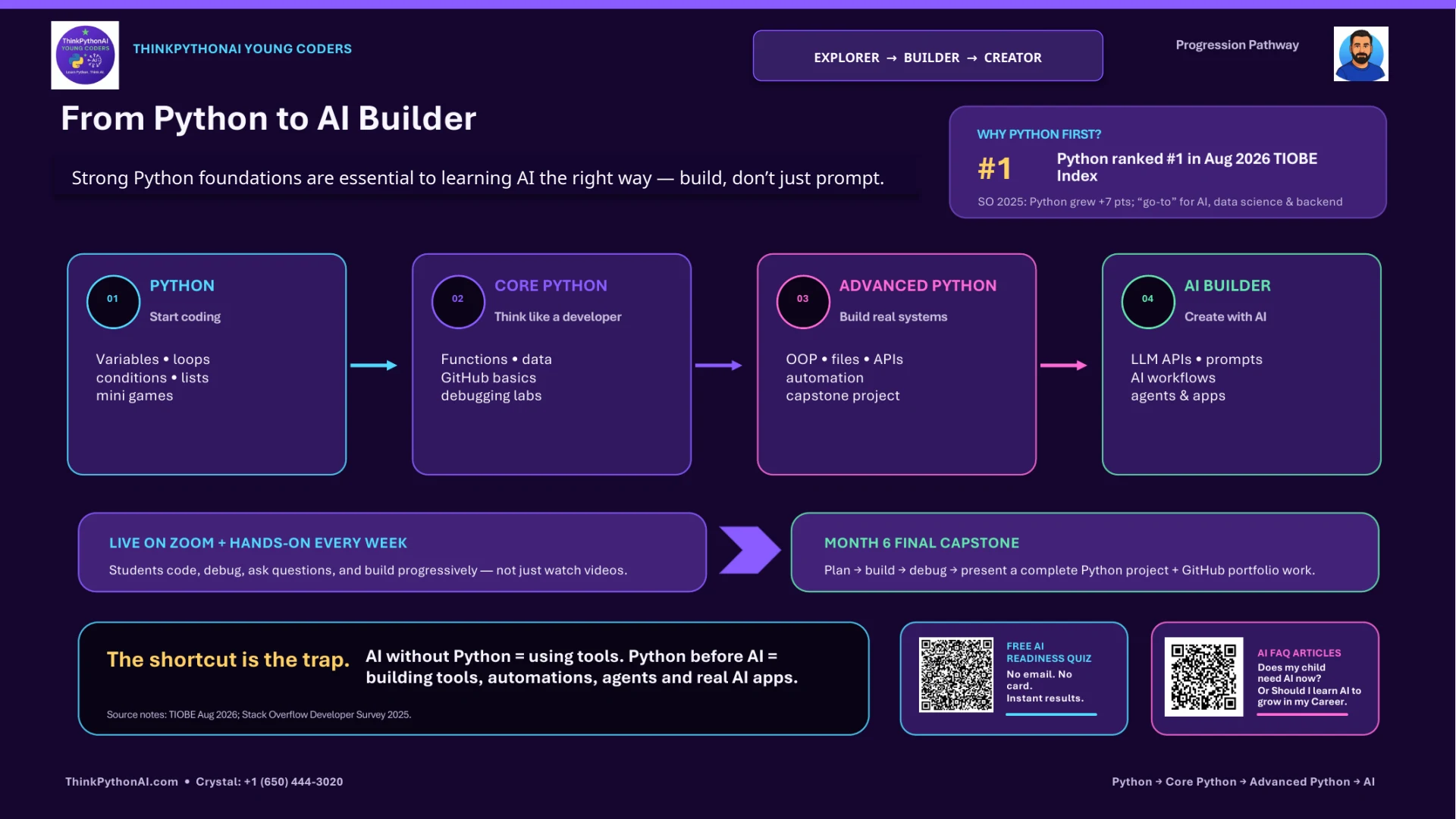
Python → AI Pathway
The full journey on one page: how students progress from first program to AI systems.
Python Explorer
24 weekly live classes: foundations, Coding Gym, Debugging Gym, first GitHub projects, Explorer capstone.
Python Builder
24 weekly live classes: program design, files, OOP basics, APIs, automation, Builder capstone.
Python Creator
24 weekly live classes: architecture, APIs & integrations, testing, workflows, Creator capstone.
AI Explorer
How LLMs work, verification, responsible AI, AI Debugging Lab, first AI app.
AI Builder
LLM APIs, embeddings, RAG, tool use, evaluation, AI Builder capstone.
AI Creator
Agents, orchestration, advanced RAG, guardrails, AI systems capstone.
How to start
From “where is my child?” to the right class
Students join when they're ready and are placed into a cohort at their level. No waiting for a full class of the same grade.
- 1
Check AI readiness
A free 60-second quiz: where your child stands in the age of AI, and what to do next.
- 2
Talk to Crystal
Our Young Coders coordinator learns about your child's experience, confidence and goals.
- 3
Get placed
Explorer, Builder or Creator (or the AI pathway), in a cohort that fits their level, age, pace and schedule.
- 4
Start & climb
Weekly live classes, practice, parent updates and monthly checkpoints. Move up when ready.
Know where your child stands in the age of AI.
Six questions. A personalized readiness score and an honest recommendation. Free, no email needed. Then Crystal can help with placement.
Tuition: Python $179 / $229 / $279 per month (Explorer / Builder / Creator), AI pathway +$50. See Young Coders tuition →
Questions parents ask
Why don't you group students by grade?+
Because coding ability doesn't follow school grade. A 5th grader with two years of coding can be well ahead of an 8th-grade beginner. Grade-based classes hold the first back and overwhelm the second. We place students by experience, confidence and readiness, and still consider age and maturity when forming cohorts so the group feels right socially.
How do you decide my child's level?+
Start with the free AI readiness quiz, then message Crystal, our Young Coders coordinator. She'll ask about any coding your child has done and, where needed, arrange a short skills check. Your child is then placed at Explorer, Builder or Creator in a cohort that fits their level, pace and schedule.
What ages is Young Coders for?+
Most students are roughly in Grades 5–10. Age is a guide, not a gate: placement depends on readiness, so a younger student with experience can start at Builder, and an older beginner starts at Explorer without feeling out of place.
Can my child move up a level?+
Yes, that's the point of the system. Each level is roughly a 6-month pathway with weekly live classes, but progression is based on skill, not the calendar. Monthly checkpoints show where your child is, and when they're ready for more challenge, they move up.
Does my child still need to learn Python if AI can write code?+
More than ever. AI can generate code, but someone has to read it, test it, debug it and decide whether it's right. Students with real programming foundations can build AI applications; students without them can only use AI tools. That's why we recommend Python first.
Can my child go straight into the AI pathway?+
We recommend Python foundations first. If your child already codes, they can take a readiness assessment and, if they're ready, join the AI pathway directly at the right level. The AI pathway is not a prompt-writing course: students write Python to build real AI applications.
What is Coding Gym?+
Short, frequent coding reps during class: mini challenges, logic puzzles, timed problems, pattern problems and small game mechanics. Students write the code themselves instead of copying the instructor. It builds coding fluency the way practice builds fluency in a sport or an instrument.
What is Debugging Gym?+
From around Month 3, once students know enough to debug meaningful programs, they practice finding and fixing bugs on purpose: Find the Bug, Predict → Run → Fix, mystery bugs, pair debugging and explaining why a program failed. Later they review code AI wrote and work out what's wrong with it. It's one of the most valuable skills in the age of AI.
Are classes live or recorded?+
100% live, in small groups on Zoom: one 60-minute class a week, about 24 classes per level, led by Ankit, a Senior Software Architect with about 22 years of industry experience. Students code during class, ask questions, debug live and present their work. Every class is also recorded, with lifetime access for review.
How much does Young Coders cost?+
Tuition is monthly for one 60-minute live class a week, and follows the level your child is placed at. Python: Explorer $179, Builder $229, Creator $279 per month. The AI pathway is $50 more at each level: AI Explorer $229, AI Builder $279, AI Creator $329. Placement is free, and the price only changes when your child moves up a level.
Does my child get a certificate?+
Yes. Every level ends with a fully verifiable ThinkPythonAI certificate. Each one carries a unique credential ID and a QR code that links to a public verification page, so anyone (a school, a summer program or a future employer) can confirm it's real. Keep it for school and college applications, and add it to LinkedIn later when your child is ready.
Is there homework, and how will I know how my child is doing?+
Yes. Each class ends with practice so learning continues between sessions. Parents get progress updates covering skills practiced, project progress, strengths, areas to practice, and progress toward the next level, plus monthly checkpoints.
What does my child end up with?+
A capstone at every level: planned, built, tested, debugged, improved and presented. As they progress, projects go on GitHub so their work builds into a real portfolio. We introduce GitHub step by step and don't expect professional Git skills from beginners.
Run a school or district program? See school options → · Looking for summer? Summer Camp →